
Casino Kingdom Bitcoin (BTC) Deposit Guide for New Zealand Players
Bitcoin (BTC) Deposit Limits, Fees & Processing Times at Casino Kingdom (NZD)
For players in New Zealand, Bitcoin (BTC) is one of the most flexible and modern ways to deposit funds at Casino Kingdom. This payment method allows you to transfer cryptocurrency directly from your crypto wallet, offering a high level of control, privacy, and efficiency.
Many Kiwi players choose Bitcoin because transactions are typically processed quickly, often within minutes depending on network conditions. This means you can access your balance and start playing shortly after confirming the transaction. Unlike traditional banking methods, Bitcoin does not require sharing card or bank details, which adds an additional layer of security.
Before making your first BTC deposit, it is important to understand the minimum and maximum deposit limits, potential network fees, and the typical confirmation times. While deposits are usually fast, processing speed can vary depending on blockchain congestion. Withdrawals may also involve additional confirmation steps and platform verification procedures.
The table below provides a clear overview of Bitcoin deposit limits, estimated fees, and transaction speeds for Casino Kingdom players in New Zealand, helping you manage your funds efficiently and avoid unexpected delays during the payment process.
Bitcoin (BTC) Deposit Walkthrough at Casino Kingdom
Depositing with Bitcoin (BTC) at Casino Kingdom is designed to be a fast, secure, and straightforward process. Unlike traditional payment methods, BTC transactions rely on blockchain technology, allowing New Zealand players to fund their accounts without using bank cards or sharing sensitive financial details.
The interface follows a clear and intuitive structure, making it easy to complete a deposit in just a few steps. Below is a practical walkthrough that reflects the standard cashier flow, helping you understand where to go, what to select, and how the transaction confirmation typically appears.
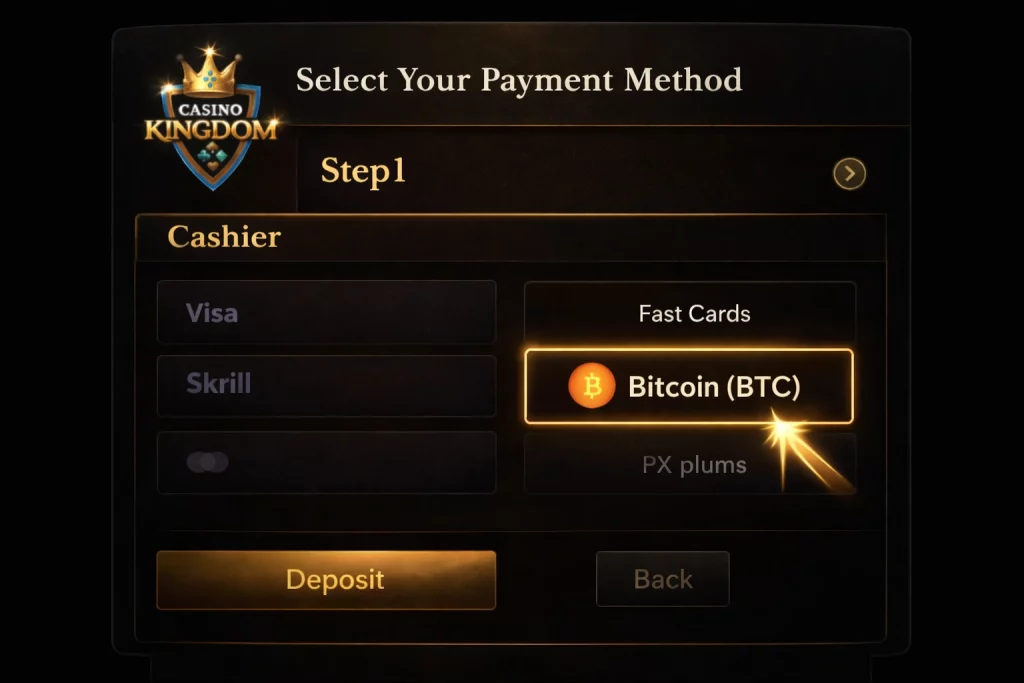
Open the cashier and choose Bitcoin (BTC)
Start by logging into your Casino Kingdom account and opening the cashier section. This is the central hub for all balance-related actions — deposits, withdrawals, and payment settings — so it’s the correct place to begin.
In the list of available payment methods, select Bitcoin (BTC). Choosing the method first ensures that the system automatically adjusts the deposit interface to crypto-specific parameters, including wallet address format, minimum deposit, and confirmation requirements.
If Bitcoin is not visible immediately, scroll through the payment options or verify that your account settings (region and currency) are configured correctly. Once selected, you can proceed to the next step.
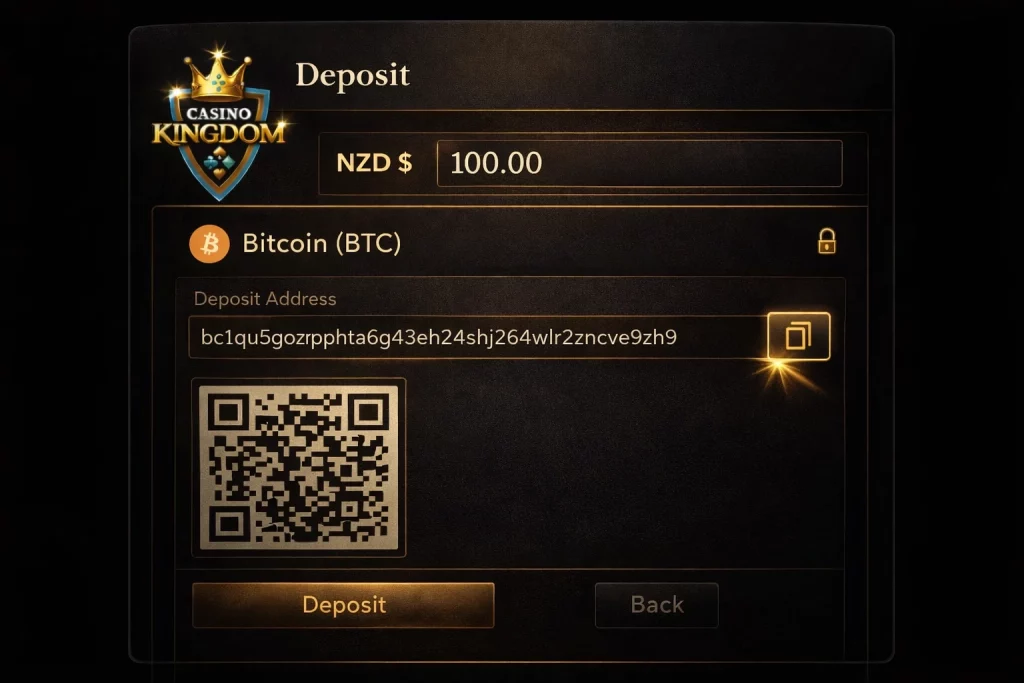
Enter the deposit amount and send the transaction
After selecting Bitcoin, enter the deposit amount in NZD (or the crypto equivalent displayed). The system will generate a unique wallet address or QR code specifically for your transaction.
At this stage, it is important to double-check:
- The deposit amount meets the minimum requirement
- You are sending the correct cryptocurrency (BTC only)
- The wallet address is copied accurately
Next, open your crypto wallet, paste the provided address, and confirm the transaction. Depending on your wallet, you may also need to approve the transfer or set a network fee.
Unlike card payments, there is no bank authorisation step. Instead, the transaction is broadcast to the blockchain and awaits confirmation.
If something goes wrong, common issues include sending the wrong currency, insufficient balance for network fees, or incorrect wallet address input. Always verify details before confirming.
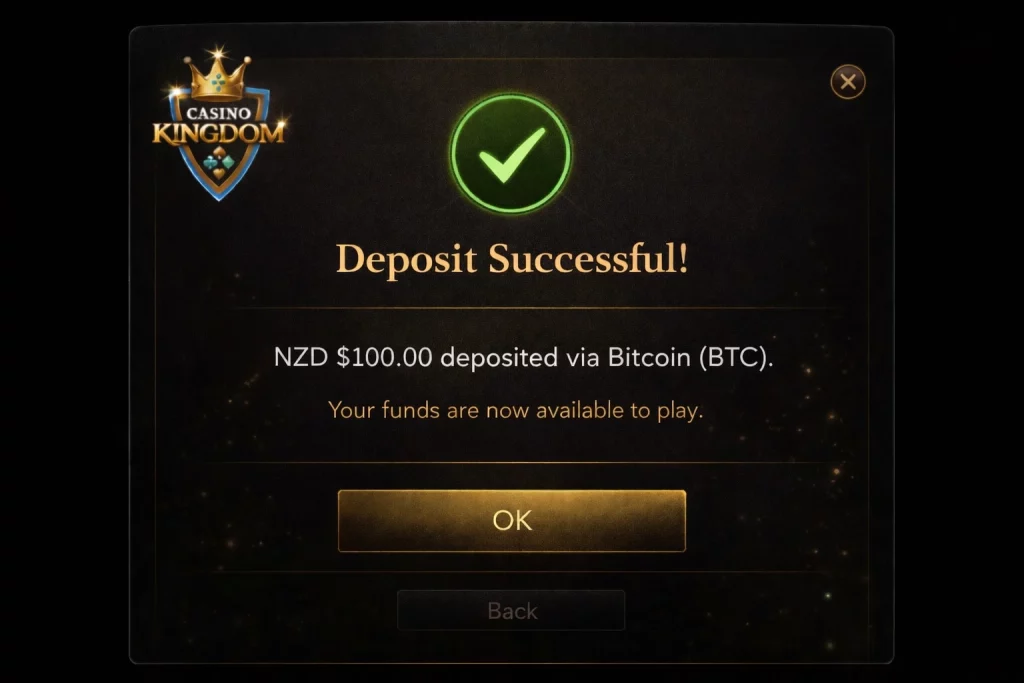
Wait for confirmation and check your balance
Once the transaction is sent, it enters the blockchain confirmation phase. Casino Kingdom will credit your account after the required number of confirmations is reached.
In most cases, this takes between a few minutes and half an hour, depending on network congestion and the fee used.
Here’s what to check to ensure everything is processed correctly:
- You see a confirmation message in the cashier
- The transaction appears in your deposit history
- Your balance updates after confirmations
- There is no prolonged “pending” status
If the transaction is confirmed on the blockchain but not reflected in your balance, allow a short delay and then check again. If needed, contact support with your transaction ID (TXID) for faster resolution.
Once your balance is updated, you can proceed directly to gameplay, activate promotions if applicable, or continue exploring the platform.
Alternative Deposit Methods at Casino Kingdom
While Bitcoin (BTC) is one of the most flexible and modern options, Casino Kingdom supports a variety of other payment methods, each with its own advantages.
Depending on your preferences, you may choose between:
- Traditional banking methods
- E-wallet solutions
- Other cryptocurrencies
Some methods prioritise instant deposits, while others offer higher limits or different withdrawal conditions. Exploring these options allows you to select the most suitable payment strategy based on your needs.






Comments